Friday, 24 July 2015

RouteShoot in Vanuatu

RouteShoot are delighted to welcome on-board our client from Vanuatu.

Port Vila Urban Development Project is a Donor funded project that is currently 80% of the way through the detailed design, with construction due to start in a few months.

Over the past 12 months, the design of all the road upgrading, drainage and sanitation under the project has been finalised in preparation for the construction of roads and drainage facilities. 

The project is the most significant investment in the country since independence 33 years ago and is a jointly funded initiative of the Government of Vanuatu, Australian Aid and the Asian Development Bank.


The Challenge


The Design, Supervision and Capacity Development Team working out in Vanuatu on the Port Vila Urban Development Project were looking for a tablet application with the ability to quickly and easily record video of a road related design and construction activity, and then have the information available via a map.

''RouteShoot's platform has proven very useful during the design stage of the project, allowing designers and drafters quick and easy reference to the physical landscape''.

During construction activities, it is proposed that supervision teams would have the ability to record construction issues out in the field, aswell as add comments and flags (such as Contract Variation and defects), whilst Community liaison teams back in the office needed to be able to record details and again log various further action.

Before RouteShoot


Prior to RouteShoot the team out in Vanuatu were capturing data via digital cameras and still data was filed in generic style filing formats. The volume of data collection and management as well as their need to complete projects efficiently was restricted by the delay between collecting data in the field and analysing it back at office to determine the next steps of their projects.

Now...


Data collection, observations, and general management of the Port Vila Urban Development Project now operates in near real-time and this has changed things significantly for the project team.

Further to this, RouteShoot has also been used in recently presenting to the client where a projection of the design model was viewed in conjunction with Route Shoot video and map presentation.

Wednesday, 8 July 2015

RouteShoot Infographic by the Numbers

In early 2012, developments in technology - which saw full 1080p HD video recording incorporated into a smartphone (such as the iPhone 4) - meant that it became possible to achieve what several specialist companies offer using just the everyday devices available in most people’s pockets.

RouteShoot was born!

We give you the numbers so far...

Sign up for a 30 day free trial of RouteShoot and see what you can make of your mobile data capture!

Monday, 29 June 2015

An introduction...

Hello! I’m Jamila from Switzerland and I am undertaking an internship abroad in Exeter working for RouteShoot for five weeks. You will find me assisting with social media, blogging, video marketing, email marketing and events publicity.


The place I come from called “Montagnola”, is a small Swiss village in Collina d'Oro municipality. Located in the Italian-speaking canton of Ticino, it is close to the border between Switzerland and Italy. It looks over Lake Lugano and the city of Lugano upon it.


I'm currently studying full time as a Graphic Designer at the Educational Center for Artistic Industries (CSIA) in Lugano and have just finished my 3rd year. During my time at CSIA i have gained valuable work experience with Graphic Design studios in Ticino.

I think my internship abroad is a good chance to improve my command of English and I look forward to working with and contributing to the RouteShoot team

Jamila Rickenbach

Friday, 19 June 2015

New and Improved RouteShoot

Recently, the RouteShoot website has been completely redesigned. In addition to loads of new content, new price plans, and a totally new look, we have also made some improvements to the user platform and the app!

Platform

The RouteShoot platform is where all of the magic happens so we thought we'd share with you a few of the changes that have occurred over the past few weeks.

  • RouteShoot Journal - Dynamic Thumbnails in the user activity feed now show the conversion progress.
  • Support for WMS (web map service) - The RouteShoot platform now supports custom base maps.
  • Custom Map Thumbnails - Users custom maps can now be viewed in thumbnails alongside the video via the activity feed.
  • Routeshoot Route Line - The colour of the route line can now be customised to your preference.

In addition to the amendments, frequent visitors to business.routeshoot.com may have noticed that the platform got a bit of a facelift recently. Once that endeavor went live, we immediately took aim at doing the same thing for our website.


www.RouteShoot.com

Earlier this week we rolled out a complete redesign of the RouteShoot website with a new look & feel, cleaner interface, and a more comprehensive overview of the RouteShoot product and options available to the user. Visit www.RouteShoot.com now to take a look at the richer, easier to navigate, snazzy new website!


The RouteShoot App

Our latest version of RouteShoot for Windows has just gone live on the Windows Phone Store, and is bringing some great new functionality to the product. We’ve been making big strides to get our Windows app to the place where it’ll be a fantastic data collection platform for teams working on gathering data out in the field. Below are a list of updates in version 1.1.0.9:
  • Duration and file size of the video now appears in the library display
  • The ability to delete the video and KML from the library has now been actioned
  • The order in which the items are displayed in the library is now time descending
  • A position marker has been added to the video playback map
  • Better user feedback for issues relating to GPS
  • The recorder timer is now visible on the display screen
  • The option to track GPS position on playback has also been added
  • Bookmarking feature is now enabled

Download the latest version of RouteShoot from the Windows Phone Store now to get access to a couple of cool new features!

Keep up with the latest RouteShoot news by following us on Twitter!

Future Highways 2015 - The KIA Oval Cricket Ground

The RouteShoot Team have just returned from London following a great Future Highways Conference. This was our first Future Highways Conference, and as with many of these exhibitions, the best thing about attending is being surrounded by all the creative energy of folks excited about implementing innovative stuff!


General Observations

  • The conference venue was an excellent choice with fantastic views over the oval cricket ground.
  • The recommended hotel was a good call, easy to get to and within walking distance to get to the venue itself. 
  • The food was exceptionally good and there were plenty of open spaces which was a plus for socialising and general networking. 

Key Takeaways

  • Conference speakers continued to impress with entertaining and insightful talks relating to the highways industry.
  • Over at the stand we met lots of interesting people - clients old and hopefully new.

RouteShoot at Future Highways 2015

Future Highways was a professional development opportunity for our team. Although there were responsibilities of manning a stand, we were still able to enjoy the sessions of our choosing, network with potential clients and come away with ideas to brainstorm what’s next for RouteShoot.


Attending events like Future Highways reinvigorates our creative approach, helps us personally connect with our clients and colleagues, and re-energises our commitment to building the best mobile video collection platform available.

Thursday, 21 May 2015

The RouteShoot Platform Gets a Design Refresh

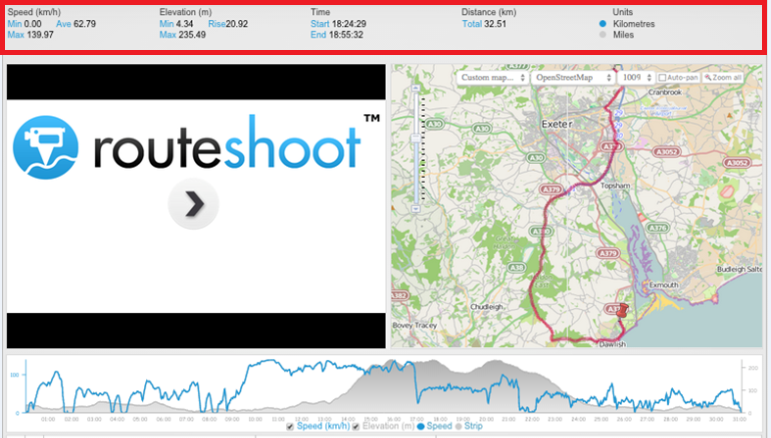
Frequent users may have noticed that the RouteShoot platform got a bit of a facelift recently. We originally went with the tried and true 'numbers in a line' layout in the main header, consisting of Speed, Elevation, Time and Distance.


However, we felt there was a certain lack of joy in the design of the old layout. There wasn’t necessarily anything wrong with it, but it didn't make make us feel pleased when we looked at it.

The rework began, the desire being to make the captured data a little more...shall we say...aesthetically pleasing, aswell as offering more information!

In doing so we replaced the Speed, Elevation, Time and Distance numbers with dials and summarised a display of captured statistics including:
  • Video Title
  • Location Address
  • Long/Lat Coordinates
  • Time & Date Stamp
As a result of the changes, the information captured is now available in an instant snap shot!


While we’re always making incremental improvements to the site, it’s nice to give things an overhaul now and then when they fall behind. Even something as straightforward as a design refresh can have many areas ripe for improvement when you focus on what really matters.

Check back with us in the coming weeks and months to see what else we send to the cutting room floor.

Wednesday, 20 May 2015

Tips to help you get the most out of your Mobile Device.

So here you are trying to keep up with the ever-changing technology and you recently started to collect your data digitally though your Smartphone or tablet device. Beside all of the great advantages that this change has, you will probably quickly realise a few not so great things. 

The battery can drain quickly when the device is constantly being used.  The more you use your mobile device, the more prone you are to dropping and damaging it. 

The goal of this blog post is to provide RouteShoot users some solutions to these problems.

Maximize battery life

Out of all the problems, short battery life is probably the most common. Spending long days away from a power outlet or vehicle can leave you with little to no battery power on your smart device. Data collection done on your cell phone makes this even more of an issue. Here are some simple steps you can take to help retain power throughout the day.

Features like Bluetooth and Wi-Fi are great but if you are not using it then it is unnecessarily draining your battery. Turn these features off when they are not in use.
If you are going to be working in a remote place where you know you will not have a data signal, turn off you data connection. Important Note: I would not recommend simply turning on airplane mode, because this mode turns off the internal GPS.

Close any apps running in the background. For iOS devices (iPhone/iPad), double-click the Home button to view the multitasking bar. Then swipe the apps upwards to close the apps running in the background. For Android devices – go to settings, applications, and then manage applications. Then tap on the app and select force stop. There are also third party apps that have auto-kill features.

Lower the brightness settings. This may work for you since most data collection is done outside during daylight hours.

Adjust the fetching frequency of apps on your mobile device. The more apps you have that periodically go and fetch data on the internet, the more battery power will be consumed. Purchase a battery backup. They are available for pretty much every Android and iOS device out there. Backup battery packs allow users to charge their device in the field when not near a vehicle or power outlet.

Protect your device

Protecting your smart device can often be overlooked when first purchasing. If you have ever dropped your phone or tablet and had the screen spider web with cracks, then you've probably learned the lesson the hard way. Mobile devices can get pretty expensive, so spending a little extra money for a good quality case should be a simple choice. 

When using a mobile device to do work, the cost of the device is not the only thing you should consider when and if the device breaks.Time lost not working and potential data loss should also be considered.

Increase the reliability and accuracy of the devices GPS

The accuracy and reliability of the internal GPS in mobile devices is probably one of the most overlooked issues a mobile data collector faces. While the GPS on most devices are pretty good, there are instances where they can be non-functioning and unreliable. To eliminate these problems an external GPS receiver will ensure that you have to make far less geo-position corrections and that you get the best reliability available.

There are a lot of different options available on the market. Some units connect directly to the device and are generally powered by the mobile device. Others have their own internal batteries and utilise Bluetooth technology to stay connected.


These are just a few ways to optimise mobile data collection.  For all of those actively in the field, we would love to hear your ideas and contributions. Please post your feedback and let us know what works for you.